Support Triage with Liquid AI Decision Models
Use Liquid AI decision models to classify support tickets, identify refund requests and assess urgency, reducing manual triage while keeping people in control.
Executive brief
Every incoming support ticket creates work before anyone can resolve it. Someone needs to read the message, identify the request, choose a team and decide how quickly it needs attention. Messages with several issues can move between queues while customers wait.
Automated support triage can improve efficiency and reduce manual sorting by preparing those assessments as messages arrive. Liquid AI's decision models can help identify intent, assign categories and assess urgency, giving support staff a starting point for handling each ticket.
People can retain the final decision wherever needed. A model can recognize a refund request without authorizing a refund. Your business defines routing rules, escalation requirements and which actions need approval.
| Potential business benefit | How automation could help |
|---|---|
| Less manual sorting | Prepare intent, topic and team labels before an agent opens the ticket. |
| Faster assignment | Send straightforward requests to the appropriate queue using agreed rules. |
| Fewer missed issues | Identify multiple topics in one message, such as billing and delivery. |
| More focused reviews | Flag uncertain classifications and cases requiring specialist attention. |
These are potential benefits to measure against your current process. The notebook example below demonstrates the model step; helpdesk integration and production routing would be additional work.
Custom support automation for your business
AIBackends builds workflows connecting your inbox, helpdesk and business systems, with your routing rules and human approvals.
One message, four useful assessments
Our d1-2B notebook includes a support triage example using this sample customer message:
I was charged twice and my parcel never arrived. Please refund one charge.
A single label would leave out part of the request. Billing needs to investigate the duplicate charge, while the missing parcel introduces a delivery issue. The example asks four questions about the same message:
| Assessment | Question | Result shown in the sample run |
|---|---|---|
| Refund intent | Is the customer asking for a refund? | Yes-probability: 0.997 |
| Responsible team | Which team should handle this? | Billing, with a displayed probability of 0.72 |
| Topics | Which topics does the message raise? | Billing and delivery |
| Urgency | How urgent is the ticket? | Medium on the example's scale |
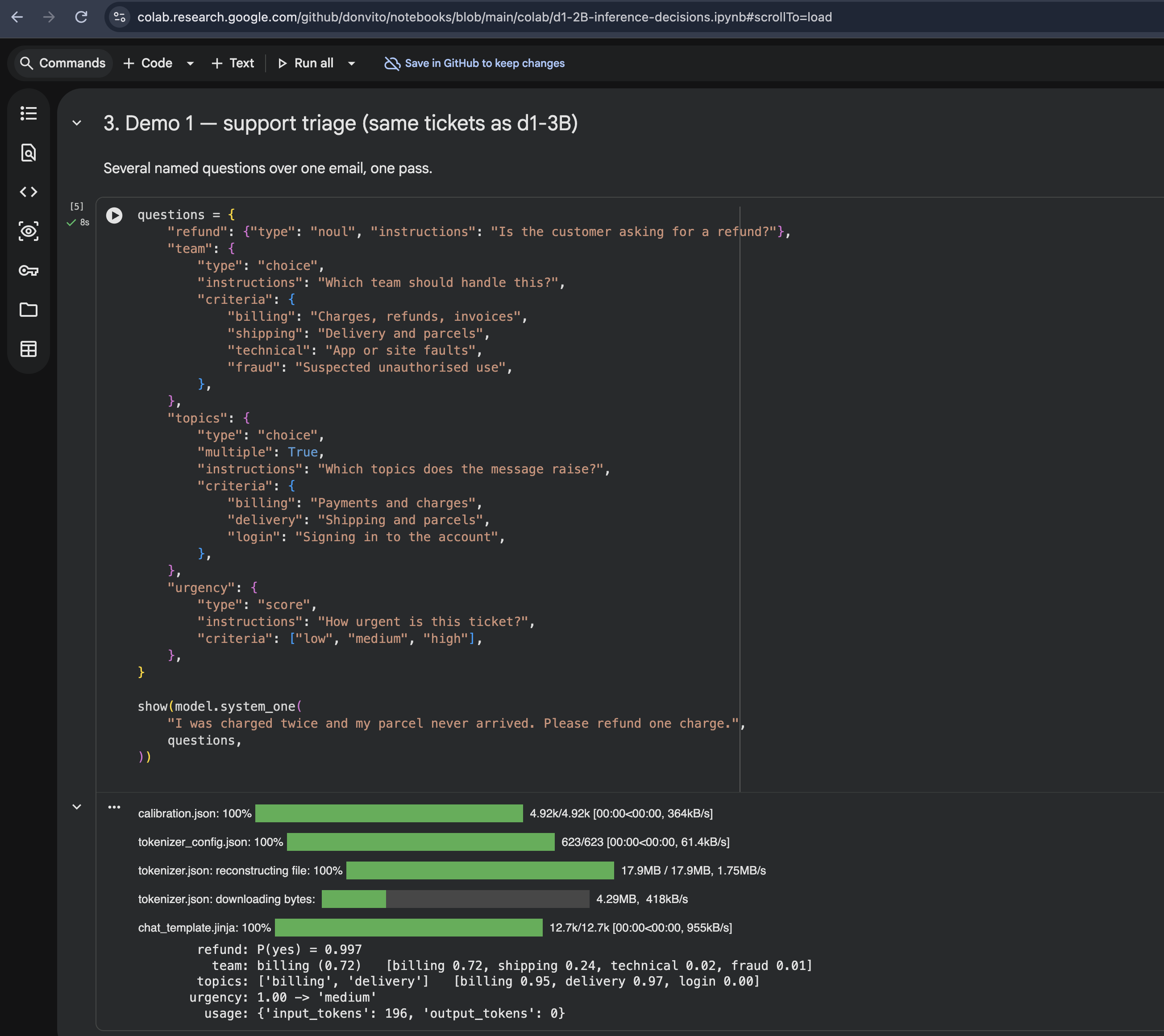
The supplied notebook screenshot shows one sample run. Its probabilities describe model assessments, not measured accuracy across customer tickets. We have not independently rerun the model for this article.
The billing result leads the available team choices, but shipping also receives probability. A production workflow could assign a primary owner and retain both topic labels so the delivery issue stays visible. The business should decide whether to create a linked task, notify another team or let the primary owner coordinate the response.
Why a decision model fits triage
Liquid AI's d1-2B documentation describes a model that answers defined questions without generating text tokens. In this example, yes/no questions detect refund intent, a choice selects a team, multiple selections identify topics and a score assesses urgency.
Your team defines the categories and their meaning. The model assesses the message within that structure, and the surrounding workflow decides what happens next. This makes the output useful for ticket fields, queue assignment and review flags.
Detecting intent does not establish whether the customer is entitled to an action. Refund eligibility still needs verified payment records and company policy. An urgency label also needs a business definition: the example's broad low, medium and high scale would need clearer criteria before controlling response targets.
Two deployment approaches
Liquid AI offers hosted and open-weight decision models. Choose an approach based on your data requirements, operating capacity and evaluation results.
| Approach | How it works | What to consider |
|---|---|---|
| Hosted API | Your application sends ticket context to Liquid AI and receives structured assessments. | Data permissions, API costs, availability and supported question types. |
| Local deployment | An open-weight model such as d1-2B runs within your infrastructure. | Hardware, deployment, maintenance and quality on your tickets. |
The notebook runs open-weight d1-2B through Transformers. You can open it in Google Colab to explore the example. Colab runs on Google's cloud; running the model within your own infrastructure requires a separate deployment. Check that your chosen model and runtime support the question types you need.
From a model result to a support workflow
flowchart TD
  A[Incoming email<br/>or support ticket] --> B[Prepare message<br/>and relevant context]
  B --> C[Liquid AI<br/>decision model]
  C --> D[Intent, team,<br/>topics and urgency]
  D --> E{Routing rules<br/>and review checks}
  E -- Ready to route --> F[Assign owner<br/>and labels]
  E -- Needs review --> G[Human triage]
  F --> H[Agent investigates<br/>and responds]
  G --> H
The integration should preserve the original message, model assessments and any agent corrections. Uncertain answers or a failed model call should leave the ticket in a visible review queue. The proposed workflow above does not send replies, issue refunds or close cases automatically.
Start with one queue
Pilot the workflow on tickets your team has already reviewed. Measure assignment time, reassignment rates, correction effort and missed urgent cases. Set review thresholds from those results rather than treating model confidence as a guarantee.
Start with labels and suggested assignments, then expand automation where the evidence supports it. Keep agents able to correct classifications and use those corrections to improve the questions and routing rules.
For another application of this pattern, see receipt claims processing with Liquid AI. To explore a support workflow for your business, email us about your current process, including the inbox or helpdesk, common ticket types, systems involved and approvals you need to retain.